A 24/7 AI agent for a home-service company. It answers questions from the company’s own documents, gives safety instructions first in emergencies, and turns conversations into booked leads in Google Sheets, with an instant Telegram alert to the team.
Personal demo project
SunCoast is a fictional HVAC and plumbing company in Orlando, created for this project. The system, data, and test results are real.
| Role | Solo build: design, automation, prompt engineering, testing, hosting |
|---|---|
| Stack | n8n (self-hosted), Google Gemini, Qdrant Cloud, Google Sheets, Telegram, AWS Lightsail |
| Result | 49 of 50 test scenarios passed after fixes, including 10 of 10 safety-critical tests |
The problem
Home-service companies lose jobs when nobody answers. Customers call at night, on weekends, and during busy hours. If no one picks up, they call the next company.
Answering every call has its own risks:
- Wrong information. A tired employee or a generic chatbot can quote the wrong price or policy.
- Emergencies. A customer who smells gas needs safety instructions before anyone talks about booking.
- Lost leads. Details written on paper or in a chat log never reach the team.
What I built
An AI agent that a customer can chat with at any time. It does three jobs:
- Answers questions from the company’s own documents. Prices, hours, warranties, financing, the service area, and the Comfort Club membership all come from an 11-document knowledge base, not from the AI’s general knowledge.
- Puts safety first. For gas leaks, carbon monoxide, flooding, electrical sparking, and extreme heat, it gives clear safety steps before anything else.
- Captures leads. It collects six booking details (name, phone, address with ZIP, problem, preferred time, urgency), saves them to Google Sheets, sends the team a Telegram alert, and gives the customer a reference number.
It also says clearly that it is an AI, refuses prompt-injection attempts, protects other customers’ data, and offers to escalate to a human.
How it works
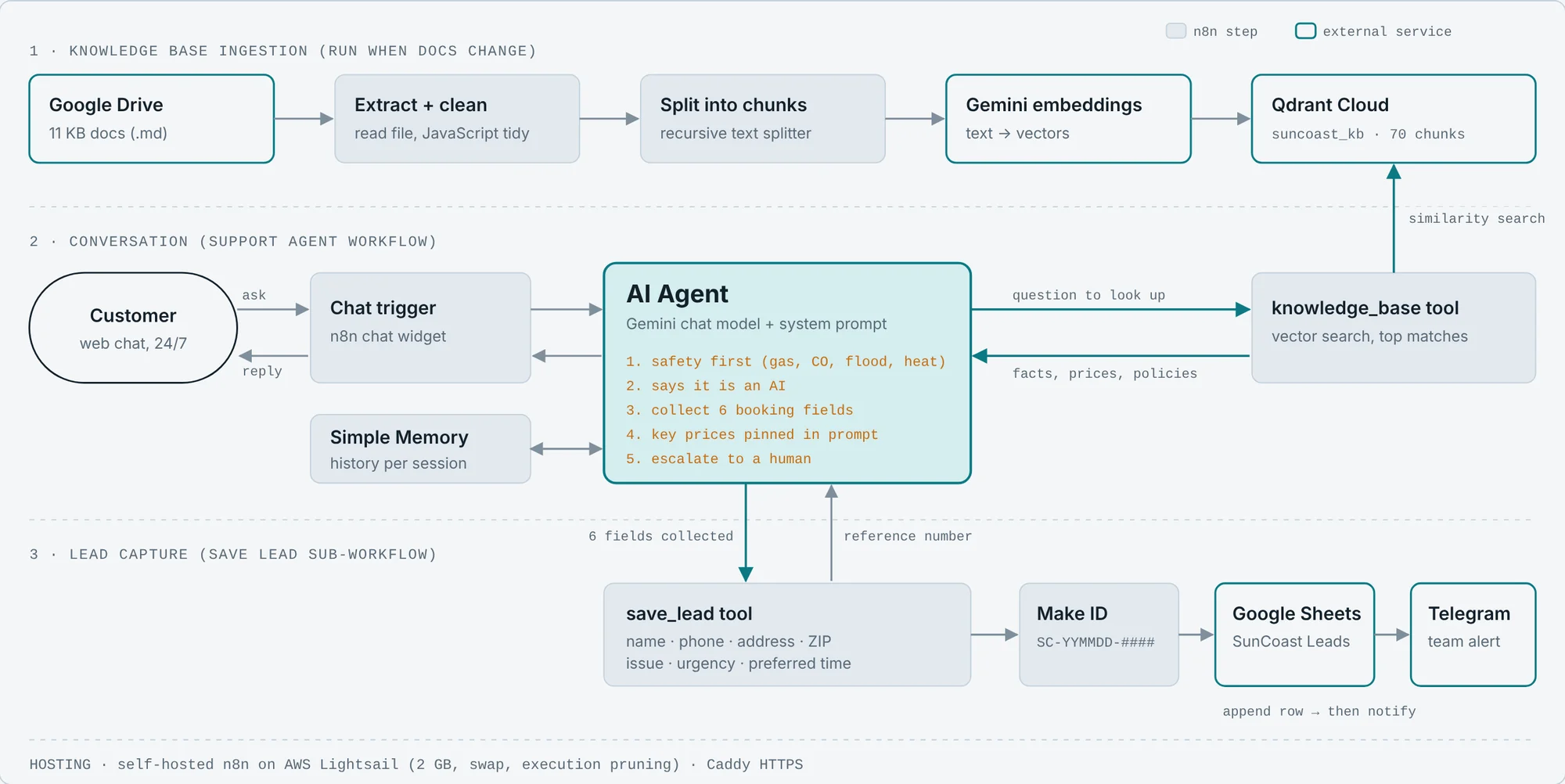
The system has three parts:
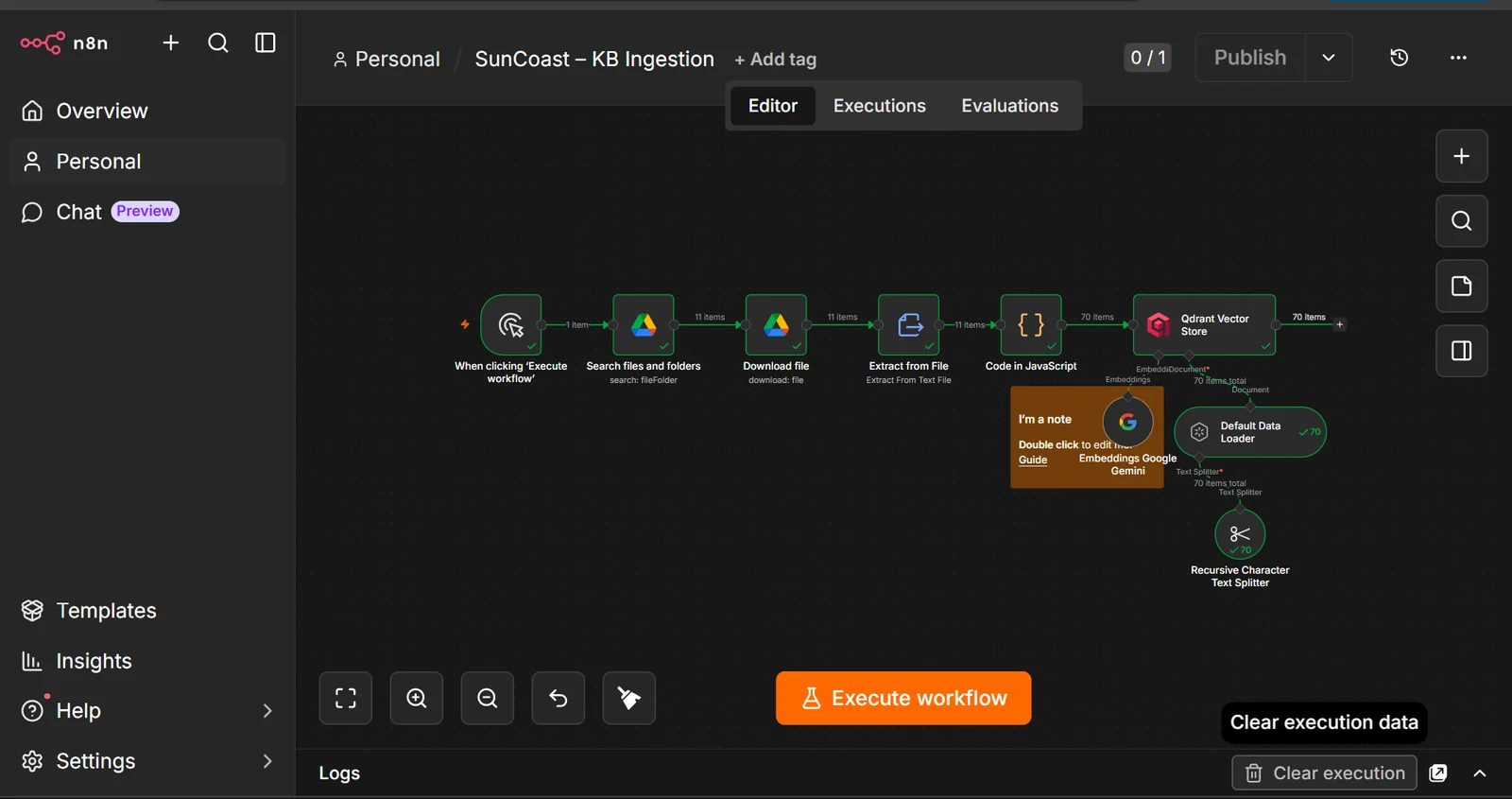
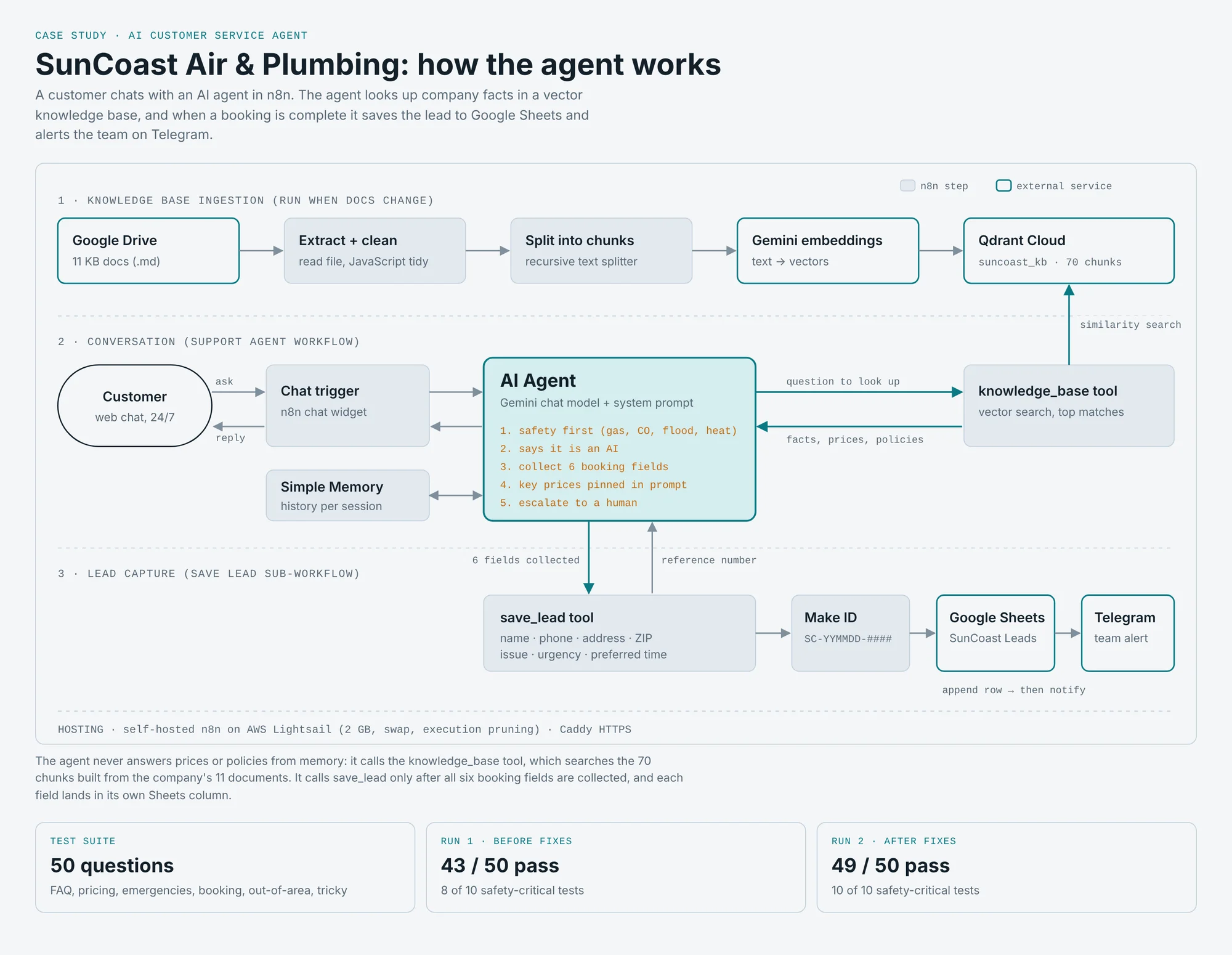
1. Knowledge base ingestion. An n8n workflow reads 11 Markdown documents from Google Drive, cleans them, splits them into chunks, turns them into vectors with Gemini embeddings, and stores them in Qdrant Cloud (collection suncoast_kb, 70 chunks). Before building the agent, I ran a 10-question retrieval test; the best matches scored around 0.73.
2. Conversation. The customer’s message goes to an n8n AI Agent running Gemini, with session memory. When it needs a fact, it calls a knowledge_base tool that searches Qdrant for the most relevant chunks.
3. Lead capture. When all six booking fields are collected, the agent calls a save_lead tool. A sub-workflow creates a reference ID (SC-YYMMDD-####), appends a row to the SunCoast Leads sheet, and sends a Telegram alert. The reference number goes back to the agent, which gives it to the customer.
Key decisions
- Retrieval instead of a giant prompt. Company facts live in a vector database, so updating a price means editing one document and re-running ingestion, not rewriting the prompt.
- Critical prices also pinned in the prompt. Testing showed retrieval sometimes missed the Comfort Club price. The few numbers customers ask about most ($89 diagnostic, $75 after-hours fee, $16.95/month membership, $50 on-time promise) now also sit in the system prompt, so the agent never says “I’m not sure.”
- Safety rules before booking rules. The prompt orders the agent’s priorities: safety first, then honesty about being an AI, then booking, then escalation.
- Structured tool inputs. Each booking field is its own AI-filled parameter, so every value lands in its own spreadsheet column.
- Lead saving as a separate sub-workflow. The agent only decides when to save; the sub-workflow handles how. Each part can be tested and changed on its own.
Testing
A demo that works once is not enough for a system that talks to customers. I wrote 50 test scenarios across six categories, each with an expected answer, and scored every reply as Pass, Partial, or Fail.
| Category | Tests | Examples |
|---|---|---|
| FAQ | 8 | Services, hours, warranty, financing, cancellation |
| Pricing | 8 | Diagnostic fee, after-hours cost, new system price, price-match request |
| Emergencies | 8 | Gas smell, carbon monoxide alarm, flooding, AC out with an elderly parent |
| Booking | 9 | Full booking in one message, invalid phone number, address change |
| Out of area | 6 | Tampa and Miami ZIP codes, a gas emergency outside the service area |
| Tricky | 11 | “Are you a real person?”, prompt injection, privacy, Spanish message |
Results
| Run | Pass | Partial | Fail | Safety-critical |
|---|---|---|---|---|
| Run 1: before fixes | 43 | 6 | 1 | 8 of 10 |
| Run 2: after fixes | 49 | 1 | 0 | 10 of 10 |
Bugs I found and fixed
| Problem found in testing | Cause | Fix |
|---|---|---|
| Lead rows saved with an ID but empty customer fields | The agent sent all booking details as one sentence in a single field | Switched the tool to separate AI-filled fields ($fromAI), one per column |
| “I’m not sure of the price” for the Comfort Club | Retrieval missed the pricing chunk | Pinned key prices in the system prompt |
| No safety advice when the AC was out at 95°F with an 82-year-old in the home | No heat-emergency rule | Added a rule: give cooling and 911 warning signs first, then book as an emergency |
| A customer said “not urgent,” and the agent saved it as urgent | The agent inferred urgency on its own | Added a rule: always save the urgency the customer states |
| A Spanish message got an English reply | No language rule | Added a rule: reply in the customer’s language |
| A test lead mixed in details from earlier conversations | Several tests shared one chat session’s memory | Re-ran tests in fresh sessions; noted session isolation as a production requirement |
One “failure” was my mistake, not the agent’s. I expected it not to quote a price for a new AC system, but the agent quoted $5,500–$14,000 straight from the company’s pricing document. I checked the source, confirmed the answer, and corrected the expected answer. Checking against the source matters as much as checking the agent.
Infrastructure
I self-host n8n so the system runs on infrastructure I control.
- Problem: the first server (AWS EC2, 1 GB RAM) kept crashing under load.
- Fix: I migrated to AWS Lightsail with 2 GB RAM, a custom domain, Caddy for automatic HTTPS, a swap file for memory spikes, and execution pruning so old run logs don’t fill the disk.
- I planned and ran the migration with Claude Code, using a written migration plan.
What I’d do next
- Automated evaluation. An n8n workflow that runs all 50 tests against the agent and uses a second AI step to grade each answer, so every prompt change is re-tested in minutes.
- Real scheduling. Connect to a calendar to offer actual open slots instead of a callback.
- More channels. The same agent on SMS and a voice line.
- A team dashboard. Lead volume, urgency mix, and response times, built from the Leads sheet.
What this project shows
- Building a working AI agent with retrieval, memory, and tool use
- Writing a test plan before calling something “done,” and using it to find real bugs
- Debugging across the agent, its tools, and a sub-workflow
- Designing for safety and honesty in a customer-facing AI
- Running and fixing the hosting myself